
Valheim Crossplay Dedicated Servers: How PS5, Xbox and Switch 2 Players Join (Join Codes Explained)
What this guide covers
Valheim 1.0 shipped on September 9, 2026 with PlayStation 5 and Nintendo Switch 2 versions and crossplay between every platform. That means a single dedicated server can host friends on Steam, the Microsoft Store, Xbox, Game Pass, PS5 and Switch 2 at the same time, but only if it's configured for it, and only if everyone knows how to get in.
This is the practical version: what crossplay actually is on a dedicated server, how the join code works, exactly what each platform's player has to do, and what to check when someone can't connect. Where the steps are specific to HostSimple's dashboard we say so; everything about the game itself applies to any Valheim dedicated server.
Sources: Iron Gate's official crossplay FAQ and 1.0 announcement, plus testing on HostSimple servers. PS5 and Switch 2 are not out until launch day, so the console steps below follow the flow Iron Gate has described for those platforms; we'll update this page the day they ship.
What Valheim crossplay is
A Valheim dedicated server runs on one of two networking backends. The default is the Steam backend: players find the server through Steam, connect directly to its IP and port, and only Steam players can join. The alternative is the crossplay backend, which uses Microsoft's PlayFab service. On that backend the server registers itself with PlayFab, gets a join code, and accepts players from every platform.
Which backend a server uses is decided when it starts. The server is launched with the -crossplay flag for the PlayFab backend, or without it for Steam. There is no way to switch while it's running; changing modes means a restart. On the client side, Valheim also has its own crossplay setting in the game's options that has to be on for a player to see or join crossplay servers.
Which platforms can play together
| Platform | Joins a Steam-only server | Joins a crossplay server | How they join |
|---|---|---|---|
| PC — Steam | Yes | Yes | Join code, or Join IP with the address |
| PC — Microsoft Store / Game Pass | No | Yes | Join code only |
| Xbox Series X|S, Xbox One | No | Yes | Join code only |
| PlayStation 5 (from Sept 9, 2026) | No | Yes | Join code only |
| Nintendo Switch 2 (from Sept 9, 2026) | No | Yes | Join code only |
The rule of thumb: if anyone in your group is not on Steam, the server must be in crossplay mode, and that person will join with the code. Steam players are the only ones who can also connect by IP. No console can host a dedicated server; the world has to live on a PC that stays on or on a rented server.
How crossplay works on a dedicated server
When a crossplay server boots it logs in to PlayFab, creates a network session, and prints a line like Session "My Server" registered with join code 226827. From then on it keeps re-announcing itself with that code every time the player count changes. The code identifies the session, not the machine, so it works from any platform and any network without the player needing the server's address.
Two consequences follow. First, the join code changes on every start: a restart, a crash, a game update, all of them mint a new one, and the old code stops working immediately. Second, all traffic goes through PlayFab's relay rather than straight to the server, which adds some latency compared to a direct Steam connection. It's usually not noticeable, but it's why a Steam-only group is better off leaving crossplay off.
The server still binds to its public address at the same time, which is why Steam players can keep using Join IP even on a crossplay server.
The join code
The join code is six digits, for example 461526. It's shown to whoever runs the server, and it's the only thing a console player needs besides the server password. It is not secret in the way a password is; anyone with the code still has to know the password to get in.
Where you find it depends on how the server is run. If a player hosts from inside the game, it's in the pause menu. On a dedicated server it's printed to the server console at boot. On HostSimple the dashboard reads it from the console for you and shows it on the server page, in the connection box, and in the invite text, so you never have to dig through logs. When the server restarts, the dashboard updates the code within about a minute of it coming back.
Enabling crossplay on a HostSimple server
Crossplay is a switch on each Valheim server's page in the HostSimple dashboard. It's off by default, because a Steam-only group gets lower latency without it.
1. Open your server in the dashboard and find the Console & Game Pass players card in the Set up your server section of the page.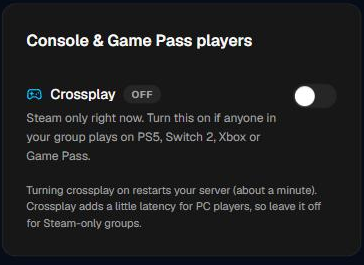 The card before crossplay is enabled. Steam-only, no join code.
2. Flip the Crossplay switch. The dashboard writes the crossplay flag to your server and restarts it. The restart takes about a minute; nobody can play during it, so pick a quiet moment.
3. Wait for the join code to appear in the card. It shows up once the server has booted and registered with PlayFab. Use the Copy button to grab it.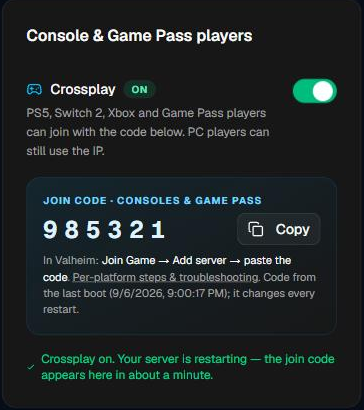 About a minute after the switch: crossplay ON and the join code, read straight from the server console.
4. Send the code and the server password to your friends. The Invite friends card builds a ready-to-paste message that includes the join code, the console join steps, and the PC address, so one copy covers everyone.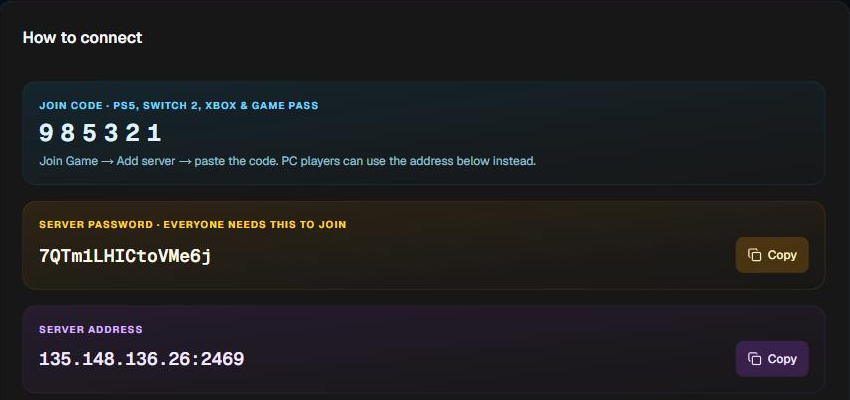 The How to connect box: join code for consoles, the password everyone needs, and the address for PC players.
Turning it off is the same switch in reverse; the server restarts on the Steam backend and the join code disappears. Anything else about running a Valheim server on HostSimple, including plans and what's included, is on the Valheim server hosting page.
How to connect from each platform
Every platform uses the same in-game screens. The only difference is whether Join IP is available.
PC — Steam. Start Game, pick a character, open the Join Game tab. Either click Add server and enter the join code, or click Join IP and enter the server address and port. Both work on a crossplay server. Enter the password when prompted. Make sure crossplay is enabled in the game's settings if you're using the code.
PC — Microsoft Store and Game Pass. Same screens, but Join IP is not an option: use Join Game → Add server and enter the join code. This version of Valheim only speaks to the crossplay backend, so a Steam-only server is invisible to it.
Xbox. Start Game, choose a character, Join Game → Add server, enter the join code, select the server, connect, enter the password. Two settings have to be on: the server's crossplay mode, and the crossplay option in your own Valheim settings on the console. Xbox players also need the console's online play enabled for their account.
PlayStation 5. Iron Gate has described the same flow: Join Game, add the server with its join code, enter the password. PS5 players cannot join by IP and cannot host. We'll confirm the exact menu labels on September 9 and update this section.
Nintendo Switch 2. As with PS5: join code under Join Game, password on connect, no IP option, no hosting. Also confirmed on launch day.
Port forwarding
None, in either mode, when the server is hosted. A HostSimple server sits on a public address with the Valheim ports already open, so Steam players connect to it directly and crossplay players connect through PlayFab. Nobody in the group has to touch a router. Port forwarding only comes up when someone hosts from a PC behind a home connection, and even then the crossplay backend relays around it.
Limitations to know before you switch it on
10 players. Valheim's dedicated server caps at 10 concurrent players regardless of hardware. Mods can raise it, but mods and crossplay don't mix (next section), so a crossplay server is a 10-player server.
The code changes on every restart. Anyone who joined before a restart needs the new code. On HostSimple the dashboard shows the fresh one; if you host elsewhere, check the console.
Relay latency. All crossplay traffic goes through PlayFab. Expect slightly higher ping than a direct Steam connection, for everyone including Steam players.
Same version, always. Valheim refuses connections between mismatched versions. After a patch, every player and the server must update before anyone can join. Consoles update through their own stores; a console player on an old build sees the same "Incompatible version" error a PC player would. HostSimple servers check for the newest build every time they start, so a restart is all it takes on the server side.
Crossplay must be on at both ends. The server has to be in crossplay mode, and the player's own game settings have to allow crossplay. Either one off and the server won't appear.
Characters don't move between platforms. A character is saved on the device it was made on. Your PC Viking and your Switch 2 Viking are different characters, even on the same server. The world lives on the server, so builds and progress are shared.
Mods, BepInEx and crossplay
Valheim mods run through BepInEx, a loader that has to be installed on the PC that plays. Consoles have no way to install it. That's the whole story: any mod that must also be on the client, which includes Valheim Plus and most gameplay mods, locks console players out. They either fail to connect or get kicked for a mismatch.
Server-only mods are different. Network Performance System, Server devcommands and other mods that only change what the server does work with unmodded clients, consoles included. The HostSimple Mods card shows a Server only or Everyone installs badge on every mod, so the rule is simple: on a crossplay server, install only server-only mods. If your group is all on Steam and wants the rest, leave crossplay off and mod freely; the mods guide covers it.
Also remember that mods break for a few days after every major Valheim update, including 1.0, until their authors catch up. If you're running vanilla for crossplay you're not affected.
Troubleshooting: join code not working
Work down this list in order. Most failures are the first three.
| What you see | Likely cause | Fix |
|---|---|---|
| Code rejected / server not found | The server restarted and the code changed | Get the current code. On HostSimple it's on the server page; it updates within a minute of a restart. |
| Code rejected right after a restart | Server is still booting; it hasn't registered with PlayFab yet | Wait until the dashboard shows the server online and a code, then try again. First boots after an update can take several minutes. |
| Server doesn't appear at all for a console player | Crossplay is off on the server, or in the player's game settings | Check the switch shows ON (a Steam-only server has no join code). Have the player enable crossplay in Valheim's settings. |
| "Incompatible version" | Player and server on different builds after a patch | Update the game on the player's platform. Restart the server so it pulls the newest build. |
| Connects, then disconnects or gets kicked | Server has client-required mods, or wrong password | Remove client-side mods for a crossplay server. Re-check the password; it's case-sensitive. |
| "Server is full" | 10-player cap reached | Someone has to leave. The cap can't be raised on a crossplay server. |
| Works for Steam players, not consoles | Steam players used Join IP; the server is actually Steam-only | Turn crossplay on. IP joins working proves nothing about crossplay. |
If a code is being typed rather than pasted, check for a mixed-up digit; codes are numbers only, so an O is always a 0.
Related guides
Valheim 1.0 and the Deep North: getting your server ready covers the launch-day update, world choices and mod breakage. Transferring an existing world covers moving the group's PC world onto the server before console friends join. How to set up a Valheim dedicated server covers requirements, SteamCMD setup and BepInEx. Plans and specs are on the Valheim server hosting page: Standard is $12.99/month with a 48-hour money-back guarantee, and the crossplay switch is on every plan.
Frequently asked questions
- Can PS5, Xbox and Switch 2 players join a Valheim dedicated server?
- Yes, if the server is running in crossplay mode. Console players join with the server's 6-digit join code under Join Game → Add server. They cannot join by IP address, and they cannot host a dedicated server themselves.
- Why did my Valheim join code stop working?
- The join code is generated fresh every time the server starts, so any restart, crash or update replaces it. Get the current code from whoever runs the server. The other common causes are the server still booting, crossplay being off on the server or in the player's own game settings, and a version mismatch after a patch.
- Do I need to port forward for Valheim crossplay?
- Not on a hosted dedicated server. HostSimple servers are reachable on their public address, and crossplay connections are relayed through Valheim's PlayFab backend, so there is nothing to open on anyone's home router.
- Can I use mods on a crossplay Valheim server?
- Server-only mods, yes. Console players cannot install mods, so any mod that every player must install (Epic Loot, Odin Architect, most gameplay mods) locks them out. HostSimple's Mods card labels each mod server-only or everyone-installs; keep a crossplay server to the server-only ones.
- Does crossplay make the server slower?
- Slightly. Crossplay routes traffic through Microsoft's PlayFab relay instead of a direct Steam connection, which adds some latency for everyone. If your whole group is on Steam, leave crossplay off.